
 En
En Fr
Fr De
De Ru
Ru
Audio Merger: Easily Join MP3 Files in a Few Clicks!
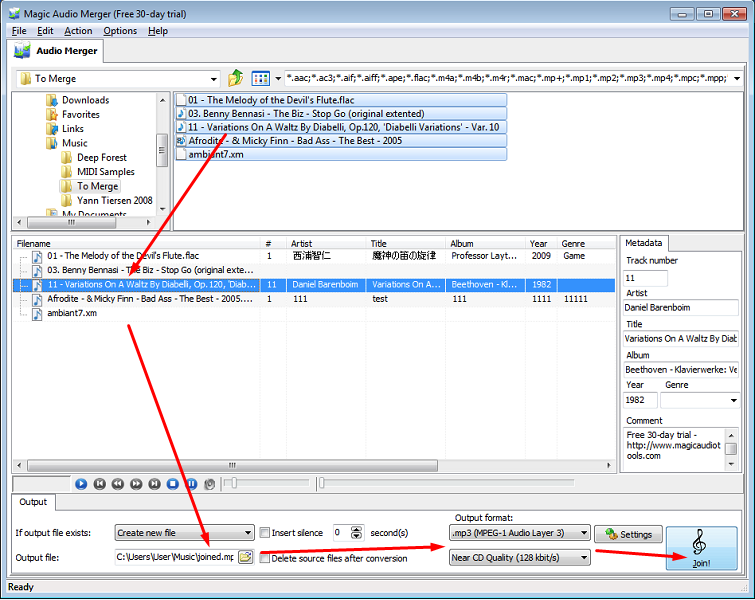

With our software you can easily merge few MP3 clips into a single track in few simple steps.
Magic Audio Merger can concatenate a bunch of smaller files together, forming a large, single file in a format of your choice, join any combination of AAC, APE, FLAC, M4A, M4B, MP3, MP4, OGG, WAV and WMA files into a single track! You can merge a bunch of downloaded music files into multiple formats to form a single playable sound track with custom pauses or gapless playback.
Merge Voice Recordings
Audio Merger is perfect for merging sound bits, recordings and voiceovers together, allowing you to consolidate your voice data into larger files.
Add or Remove Silence between Tracks
When joining the smaller files together, you have an option to add configurable periods of silence between the tracks. This is similar to how Audio CDs play.
Gapless Playback Option
Alternatively, Music Merger provides an option for smooth, uninterrupted gapless playback. Just opt to have zero pause between the fragments, and program will produce a large, uninterrupted media file.
On-the-Fly Format Conversion
Songs Merger can combine media files into different formats together. This requires a format conversion and it performs fast, high-quality, on-the-fly conversion between different sound formats and compression codecs. No need to convert clips you merge into a single format - our software will do this completely automatically.
Batch Mode
With our merger you can merge individual clips or entire folders. Available batch mode makes it easy to process your entire collection of audio clips, merging entire folders full of media files. Just specify your settings such as format, bitrate, and pauses between tracks, and the program will apply them to all clips that it merges.
Built-in Tag Editor and Media Player
You can add text information to tracks that you merge! MP3 Merger can add text comments such as album and artist info. You can easily edit this information at any time with built-in tag editor. The built-in media player allows playing back individual fragments as well as the merged files.
Features:
• Merge smaller clips into a single track
• Customizable silence between tracks
• Gapless playback option
• Merges files in multiple media formats into format of your choice
• Drag-and-drop interface
• Batch mode offers can merge entire folders
• Supported formats: AAC, AC3, AIFF, APE, CUE, FLAC, M4A, MP2, MP3, MP4, OFR, GG, SPX, TTA, WAV, WMA, WV.
• Support MOD Music in IT, MOD, MTM, S3M, UMX, and XM formats
• Support Apple Lossless Audio (ALAC) format
• Built-in media player and tag editor
• User interface available in 12 languages
System Requirements:
Minimum System Requirements:
• Microsoft Windows XP (32-bit and 64-bit)
• 1.0 GHz or faster processor
• 512 MB RAM
• 10 MB free hard drive space
Recommended System Requirements:
• Microsoft Windows 7/8/8.1/10 (32-bit and 64-bit)
• Pentium 4 or faster multi-core processor
• 1 GB RAM
• 10 MB free hard drive space
• Mp3 joiner, wav joner, wma joner, ogg joner, ac3 joner, aac joner, aiff joner, ape joner, flac joner, join m4a, m4b, join m4r, join mp1, join mp2, join mp4, join mpc, join spx, join tta, join wv, join 3gp, join 3g2 in one.
