
 En
En Ru
Ru
Convert Your MIDI Files to MP3, WAV, WMA, and More
Transform your MIDI files into high-quality MP3, WAV, WMA, or any other desired format. Customize your favorite sound font and add reverb/chorus effects to your liking.
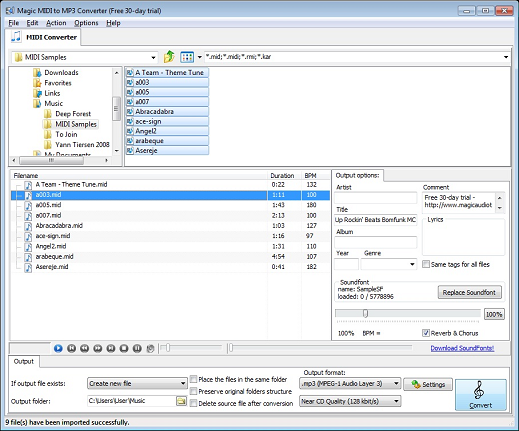
Key Features:
- Highest quality conversion based on sound sample synthesis
- SoundFont support with customizable reverb and chorus effects
- Intuitive drag-and-drop user interface
- Batch mode and built-in tag editor
- Supports .mid, .midi, .rmi, and .kar files
- Outputs in AAC, AIFF, MP4, WAV, WMA, and other popular sound formats
- Built-in media player for instant preview of applied sound effects and sound fonts
- Options to preserve folder structure
- User interface available in 12 languages

Are you a music enthusiast looking to enhance your MIDI music collection? Magic MIDI to MP3 Converter is your solution! This versatile software empowers you to convert your MIDI files into a variety of high-quality audio formats, including MP3, WAV, WMA, and more. Whether you're an aspiring musician, a sound engineer, or simply a music lover, this tool offers an array of features to elevate your musical experience.
Unlock the Potential of Your MIDI Collection
Are your old MIDI files gathering dust, hidden away on your computer? With Magic MIDI to MP3 Converter, you can breathe new life into your music library. Our program effortlessly transcodes your MIDI files into popular formats, such as MP3, WMA, WAV, AAC, and even lossless FLAC. It supports a wide range of MIDI file types, including RMI, KAR, and standard MIDI files. Plus, it includes a built-in tag editor, allowing you to customize artist, song, and album information.
Personalize Your Music with Custom Sound Fonts and Effects
What sets Magic MIDI to MP3 Converter apart is the ability to make your music truly unique. The software supports customizable sound fonts, enabling you to define your own wavetables for various instruments using the industry-standard SoundFont format. Additionally, you can add adjustable reverb and echo effects to produce tracks that sound just the way you want them to.
Instantly Preview Your Sound Creations
Want to hear the results before finalizing your conversion? The built-in media player lets you apply sound effects instantly while playing back the audio. This feature provides a real-time preview, saving you the hassle of saving and opening files in an external player.
Modernize Your Ringtone Collection
Remember the days when polyphonic MIDI files were the only option for ringtones? Today, most phones exclusively support MP3 ringtones. Magic MIDI to MP3 Converter can help you transform your old ringtones into MP3 format, ensuring compatibility with modern devices. Give your phone a fresh, updated sound with ease.
Elevate Your MIDI Tracks to Symphony Orchestra Quality
With Magic MIDI to MP3 Converter, you can use your old MIDI songs and ringtones on new mobile phones and smartphones. Say goodbye to the simple and unconvincing FM synthesizers of the past. Our program harnesses the computational power of modern PCs to employ sophisticated sample-based synthesis, delivering authentic sounds of real musical instruments. The SoundFont support enables the creation of media files with entirely different wave samples, adding a new dimension to your music.
Configure Output to Your Preference
Magic MIDI to MP3 Converter offers configurable output options. You can specify custom conversion parameters to control the quality and size of the output. Whether you need small-size MP3s for your phone's ringtones or high-quality music stored in a lossless format, this tool provides the flexibility you require.
Effortless Batch MIDI to MP3 Conversion
If you have a batch of MIDI files to convert, our software has you covered. It supports fully automated batch conversion, allowing you to convert multiple MIDIs into your chosen format in just a few clicks.
Additional Information
MIDI to MP3 Converter supports a wide range of formats and offers the highest quality conversion based on sound sample synthesis. It also provides SoundFont support with customizable reverb and chorus effects. The software boasts an intuitive drag-and-drop user interface, a built-in tag editor, and compatibility with various file types. You can output your files in AAC, AIFF, MP4, WAV, WMA, and other popular sound formats. Plus, the built-in media player offers an instant preview of applied sound effects and sound fonts.
System Requirements
Minimum Requirements:
- Microsoft Windows XP (32-bit and 64-bit)
- 1.0 GHz or faster processor
- 512 MB RAM
- 10 MB free hard drive space
Recommended Requirements:
- Microsoft Windows XP/Vista/7/8/8.1/10 (32-bit and 64-bit)
- Pentium 4 or faster multi-core processor
- 1 GB RAM
- 10 MB free hard drive space
Experience the Magic of MIDI Conversion
Ready to transform your MIDI files and elevate your music experience? Download Magic MIDI to MP3 Converter today and unlock the full potential of your music collection. Whether you're a musician, a ringtone enthusiast, or someone who simply loves music, our software offers the tools you need to create and enjoy high-quality audio in your preferred format.
