
 En
En Fr
Fr De
De Ru
Ru
How to rip CDA to .FLAC with CDA to FLAC Converter, CDA to .FLAC Ripper, CDA2FLAC Converter?
 Online CDA to FLAC Ripper, install it and run.
Start CDA2FLAC Converter.
You can start the program by clicking it on the Start menu.

Or you might have a shortcut on the Desktop; in that case double-click the shortcut icon.
After the program opens, go to the Audio CD Ripper tab,
where you can rip audio tracks to flac.

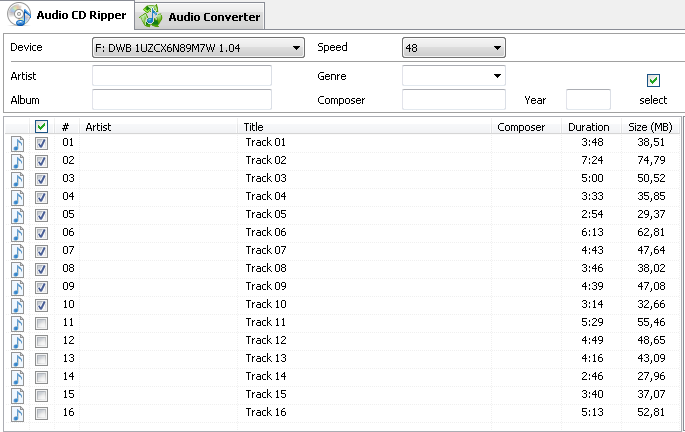
Select audio tracks you want to convert. For example, here we are going to rip audio tracks to flac files:
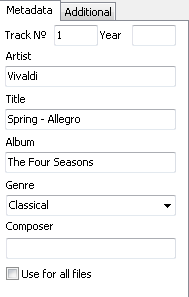
If you want to, you can edit information about each music file. Select the file and then in the Metadata section on the right-hand side, change the track number, artist, title, album, year or genre.
Next go to the Output section at the bottom of the window of the CDA to FLAC Converter. Here you set different options like what to do if the output file already exists, where the output folder is located, whether to preserve the original folder structure and what to do with the source files after the conversion process. For converting cd to flac, be sure to select .flac in the Output format box. In addition, you can specify the quality of the output. The default setting is Near CD Quality (128 kbit/s) but you can change that if you want.

Even more settings are behind the Settings button. This is where you can set the mode, quality, sample rate, bit rate and filtering.
When you are all done with setting these various options, you are ready to convert the tracks from cda to flac format.
Click  .
.
A progress window comes up to show the progress on each track and the overall progress of the whole cda to flac conversion.
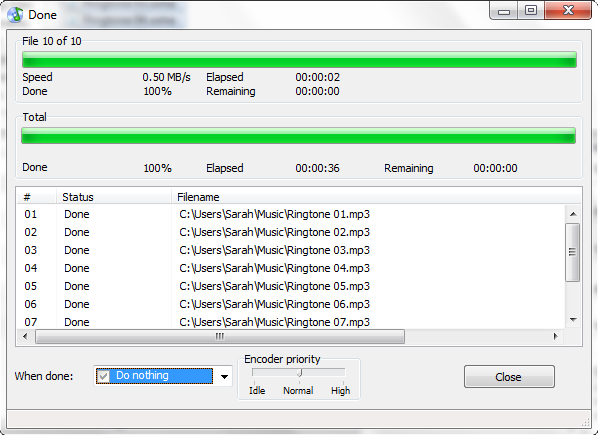
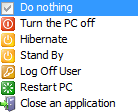
On the progress window of CDA to FLAC Ripper, you can pick what the computer should do after the conversion. The default setting is to Do nothing.
Click Close on the progress window, and you will return back to the main program.
Magic CDA to FLAC Converter System Requirements
Minimum System Requirements:
• Microsoft Windows XP/Windows Vista/Windows 7/Windows 8/Windows 8.1/Windows 10 (32-bit and 64-bit)
• 1.0 GHz or faster processor
• 512 MB RAM
• 10 MB free hard drive space
Recommended System Requirements:
• Microsoft Windows XP/Windows Vista/Windows 7/Windows 8/Windows 8.1/Windows 10 (32-bit and 64-bit)
• Pentium 4 or faster multi-core processor
• 1 GB RAM
• 10 MB free hard drive space
F.A.Q.:
How to uninstall CDA to FLAC Converter?
How do I uninstall Magic CDA to FLAC Converter in Windows Vista/Windows 7/Windows 8/Windows 8.1/Windows 10?
Click “Start”
Click on “Control Panel”
Under Programs click the Uninstall a Program link.
Select “Magic CDA to FLAC Converter” and right click, then select Uninstall/Change.
Click “Yes” to confirm the uninstallation.
How do I uninstall CDA to FLAC Converter in Windows XP?
Click “Start”
Click on “Control Panel”
Click the Add or Remove Programs icon.
Click on “Magic CDA to FLAC Converter”, then click “Remove/Uninstall.”
Click “Yes” to confirm the uninstallation.
How do I uninstall Magic CDA to FLAC Converter in Windows 2000?
Click “Start”
Click on “Control Panel”
Double-click the “Add/Remove Programs” icon.
Select “Magic CDA to FLAC Converter” and right click, then select Uninstall/Change.
Click “Yes” to confirm the uninstallation.
Frequently Asked Questions
How do I access the Magic CDA to FLAC Converter download for PC?
It’s easy! Just click the CDA to FLAC Converter download button at the page. Clicking this link will start the installer to download CDA to FLAC Converter free for Windows.
Will this Magic CDA to FLAC Converter download work on Windows?
Yes! The CDA to FLAC Converter download for PC works on most current Windows operating systems.
Tags
Convert CDA to FLAC | CDA FLAC Downloader | CDA FLAC Converter | CD Converter FLAC | CDs to FLAC | Download from CD to FLAC | best CDA to FLAC Converter | best cda2flac converter | Free Download CDA to FLAC | Download Online CDA to FLAC | CDA to FLAC Converter | CD to FLAC Ripper
